
Rencontrez ForgeRock à SIdO Lyon, les 7 et 8 Avril

Salon Internet des ObjetsJe serai présent avec notre équipe au SIdO, l’événement 100% dédié à l’Internet des Objets qui aura lieu à Lyon les 7 et 8 Avril 2015.

Outre notre présence dans l’espace coworking pendant les 2 jours, Lasse Andresen, CTO de ForgeRock, animera un workshop avec ARM et Schneider sur la place de l’Identité dans l’Internet des Objets, le Mercredi 8 à 13h30.

N’hésitez pas à venir nous rendre visite dans l’espace coworking.

Join us for The Identity Summit

Meet the Security and Identity rockstars and thought leaders at The Identity Summit, May 27-29th 2015 !

In addition to the two full days of sessions, this year at The Identity Summit, all ForgeRock customers are invited to participate in a pre-event community day where you will be able to interact with ForgeRock product development and other customers.

Photo by Anthony Quintano - https://www.flickr.com/photos/quintanomedia/
Photo by Anthony Quintano – https://www.flickr.com/photos/quintanomedia/

The event will take place at the Ritz in Half Moon Bay, California.

Register today. Sign-up for the customer user group is part of The Identity Summit registration process. Make sure to add the Customer User Group as an “Additional Item” before submitting your information.

The call for speakers is opened until April 13th.

Why I love my job !

At ForgeRock, I have multiple reasons to enjoy what I do. I have the responsibility for two products: OpenDJ, the LDAP directory services and OpenIG the Identity Gateway, and I also manages the French subsidiary. But what really gets me excited in the morning is that I get to work with very smart and passionate people!

Jean-Noël, one of the engineers of the OpenDJ development team, has a passion for beautiful code and AlpesJuggyTranshe loves refactoring, cleaning existing code. On his personal time, he started to automate his process in Eclipse, and then turn it into an Eclipse plugin, and finally made the code available as an open source project: AutoRefactor. Now, in the office, most of the engineers using Eclipse are also using the AutoRefactor plugin.

So when Jean-Noël got to present his work at our local Java User Group (the AlpesJUG), the rest of the team went along and supported him. As one of the other engineers has a passion for photography (which I share), it gives this amazing picture gallery and set of souvenirs for everyone:

AutoRefactor Session at the AlpesJUG (Feb 24, 2015)
Photos by Bruno Lavit – Click to go to the picture gallery

PS: It also helps that we are working in a great environment where we can afford to do this⬇︎ (sometime to time) during our lunch break!

FondChamrousse

About auditing LDAP operations…

OpenDJ LogoMany years ago, when I’ve started working on LDAP directory services, we needed to have some auditing of the operations occurring on the server. So, the server had a “Access” log which contained a message when an operation was received, and one when it was returned to the client, which included the processing time on the server side (the etime parameter). On Netscape and Sun directory servers, the etime was measured in seconds. This format allowed us to detect requests that were taking a long time, or were started but not finished.

In OpenDJ, we switched the etime resolution to milliseconds, but there’s an option to set it to nano-seconds. Yet, with millisecond resolution, there are still a number of log entries with an etime value of 0. The truth is that the server is faster, but so are the machines and processors.

At a rate of 50 000 operations per seconds (which can easily be sustained on my laptop), having two messages per operation does generate a lot of data to write to disk. That’s why we have introduced a new audit log format, not well advertised I must say, in OpenDJ 2.6.0. To enable the new format, use the following dsconfig command:

dsconfig set-log-publisher-prop -h localhost -p 4444 -X -n \
 -D "cn=directory manager" -w password \
 --publisher-name File-Based\ Access\ Logger  --set log-format:combined

And now instead of having 2 lines per operations, there is a single one.

Before:

[23/Feb/2015:08:56:31 +0100] SEARCH REQ conn=0 op=4 msgID=5 base="cn=File-Based Access Logger,cn=Loggers,cn=config" scope=baseObject filter="(objectClass=*)" attrs="1.1"
[23/Feb/2015:08:56:31 +0100] SEARCH RES conn=0 op=4 msgID=5 result=0 nentries=1 etime=0
[23/Feb/2015:08:56:31 +0100] SEARCH REQ conn=0 op=5 msgID=6 base="cn=File-Based Access Logger,cn=Loggers,cn=config" scope=baseObject filter="(objectClass=*)" attrs="objectclass"
[23/Feb/2015:08:56:31 +0100] SEARCH RES conn=0 op=5 msgID=6 result=0 nentries=1 etime=0

After, in combined mode:

[23/Feb/2015:13:00:28 +0100] SEARCH conn=48 op=8215 msgID=8216 base="dc=example,dc=com" scope=wholeSubtree filter="(uid=user.1)" attrs="ALL" result=0 nentries=1 etime=0
[23/Feb/2015:13:00:28 +0100] SEARCH conn=60 op=10096 msgID=10097 base="dc=example,dc=com" scope=wholeSubtree filter="(uid=user.6)" attrs="ALL" result=0 nentries=1 etime=0

The benefits of enabling the combined log format are multiple. Less data is written to disk for each operation, less I/O operations are involved, resulting in overall better throughput for the server. And it allows to keep more history of operations with the same volume of log files.

Do you think that OpenDJ 3.0 access log files should use the combined format by default ?

Happy 5 Years Anniversary, ForgeRock!

forgerock_5Y

Today marks the 5 years anniversary of ForgeRock !

5 years and the company counts over 250 employees, over 500 customers, and more than half a billion of identities protected by our ForgeRock Identity Stack ! By the way, this is just the beginning… Feeling like you want to be part of it ? We’re growing and hiring !

ForgeRock Company Meeting 2015.
A big room for the 220+ employees at the last company meeting!

I do remember celebrating the 1st anniversary, with less than 20 people and a cake, in a small hotel south of Portugal…

ForgeRock cake presented by Hermann, VP of Sales

What an amazing journey ! Thanks Hermann,Jonathan, Lasse, Steve and Victor for bootstrapping the company and giving us the opportunity to join, work hard and have fun ! Happy anniversary to the 5 of you !

The 5 ForgeRock Founders

OpenDJ on Windows…

OpenDJ LogoOpenDJ, the LDAP directory services in Java, is supported on multiple platforms and has been for many years. We’re testing on Linux, Windows, Solaris, Mac OS X, but also different JVMs: Oracle JRE, OpenJDK, Azul Zulu, IBM JVM…

With OpenDJ 2.6, we’ve made it easier for people to install it on Linux machines by providing RPM and Debian packages.

We are now also providing a MSI package to ease the installation and removal on Windows machines. The MSI package is available for nightly builds here.

OpenDJ MSI InstallerScreen Shot 2015-01-28 at 09.14.01

A fresh look for the OpenDJ and OpenIG snapshot documentation…

OpenDJ Administration Guide ScreenshotThanks to Chris Lee, the most recent technical writer at ForgeRock, there is now a new visual design for the snapshot documentation for our open source projects.
Check it out on the OpenDJ Administration Guide, the OpenDJ SDK Developer’s Guide, the OpenIDM Integrator’s Guide or the Guide to OpenIG

Happy New Year 2015!


The new year is well engaged, but it’s still time for me to give you my best wishes for 2015…

Happy New Year 2015

May this new year bring you (more) love, happiness, success… And a peaceful journey towards your personal or professional goals !


OpenIG 3.1 is now available…

It’s my great pleasure to announce the general availability of OpenIG 3.1, a minor update of the ForgeRock Open Identity Gateway product, following the press release of early December.

The Open Identity Gateway is a simple standard-based solution to secure access to web applications and APIs. It supports SAMLv2, OAuth 2.0, OpenID Connect and can capture and replay credentials, enabling SSO and Federation.

With a four months release cycle since the previous release, OpenIG 3.1 doesn’t contain many major new features, but it does bring several new enhancements to the product, including :

  • The support for encrypted JSON Web Token (JWT) cookies to store session information on the user-agent. The administrator can decide to keep the default container managed sessions, or use JWT cookies globally or for a specific route.
  • A simplification of OpenIG configuration, with the ability to inline objects, omit specific fields when empty or obvious. This simplification enables faster configuration as well as a better readability for long term maintenance of the service.
  • IMG_4090The introduction of “Decorator” for configuration objects, easily adding new behaviors to existing configured objects. OpenIG 3.1 provides 3 decorators out of the box: a CaptureDecorator that enables debugging and logging in a much easier and more dynamic way; a TimerDecorator that records times spent in the decorated objects; an AuditDecorator that allows to audit operations for any decorated objects.
  • The support for a sample monitoring handler that provides basic statistics about the exchanges and routes. The monitoring information can be used to provide an activity dashboard such as here on the right..
  • Some optimisations and performance improvements when using OpenID Connect and OAuth 2.0

For the complete details of the changes in OpenIG 3.1, please check the release notes.

You can download the ForgeRock product here. It’s been heavily tested by our Quality Assurance team : functional tests on Windows, Mac and Linux, stress tests as proxy, with OAuth2 and OpenID Connect, non-regression tests… The documentation has been entirely reviewed and all examples tested.  The  source code is available in our code repository (https://svn.forgerock.org/openig).

We are interested in your feedback, so get it, play with it and give us your comments, either on the mailing list, the wiki, the OpenIG Forum or through blog posts.


New features in OpenIG 3.1: Statistics

OpenIGOpenIG 3.1 is almost out the doors… Just a few days of testing and it will be generally available.

The new version introduces a general purpose auditing framework, and some basic monitoring capabilities. Mark wrote a blog post describing the details of the auditing framework and the monitoring endpoint. I’ve started playing with it for demonstration purposes and wanted to get more out of it.

If you want to expose the monitoring endpoint, you need to add the following 00-monitor.json file under .openig/config/routes/ and decorate a few handlers as Mark describes in his post. You might also want to extend this configuration to require authentication and avoid letting anyone have access to it.

The monitoring endpoint allows to display basic statistics about the different routes: the counts of in progress requests, completed requests and failures. So the output looks like this:

{"Users":{"in progress":0,"completed":6,"internal errors":0},
 "main":{"in progress":1,"completed":1074,"internal errors":0},
 "groups":{"in progress":0,"completed":4,"internal errors":0},
 "Default":{"in progress":0,"completed":16,"internal errors":0},
 "monitor":{"in progress":1,"completed":1048,"internal errors":0}
}

Each tag represents a route in OpenIG, including the “monitor” one,  “main” representing the sum of all routes.

I was thinking about a better way to visualise the statistics and came up with the idea of a monitoring console. A few lines of Javascript, using JQuery and Bootstrap, an additional configuration file for OpenIG and here’s the result:
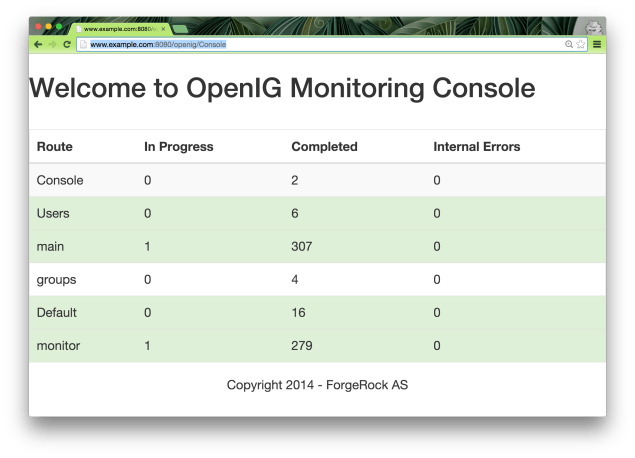
Screen Shot 2014-12-09 at 13.15.18

As you can see, this adds a new endpoint with its own audit: /openig/Console. The endpoint can be protected like any other route using OAuth2.0, OpenID Connect, SAML or basic authentication.

Let’s look at what I’ve done.

I’ve added a new route under ~/.openig/config/routes: 00-console.json with a single StaticResponseHandler. Instead of adding the whole content in the json file, I’ve decided to let the handler load the whole content from a file (named console.html). This allows me to separate the logic from the content.

00-console.json

{
    "handler":{
        "type": "StaticResponseHandler",
        "config" : {
            "status": 200,
            "entity": "${read('/Users/ludo/.openig/config/routes/console.html')}"
        }
    },
    "condition": "${exchange.request.method == 'GET'
        and exchange.request.uri.path == '/openig/Console'}",
    "audit" : "Console"
}

Note that if you are copying the 00-console.json file, you will need to edit the file location to match the absolute path of your console.html file.

Now the console.html file is actually a little bit long to display here. But you can download it here.

But it’s a basic html page, which loads Jquery and Bootstrap:

<!DOCTYPE html>
<html lang="en">
<head>
<link rel="stylesheet" href="//maxcdn.bootstrapcdn.com/bootstrap/3.3.0/css/bootstrap.min.css">
<!-- Optional theme -->
<link rel="stylesheet" href="https://maxcdn.bootstrapcdn.com/bootstrap/3.3.1/css/bootstrap-theme.min.css">
<!-- Latest compiled and minified JavaScript -->
<script src="//code.jquery.com/jquery-1.11.1.min.js"></script>
...

And at regular interval (default is 3 seconds), it gets the statistics from the monitoring endpoint, and displays them as a table:

...
<script>
$(document).ready(function () {
    setInterval(function () {
        $.get("/openig/monitor").success(writeRoutesStats);
    }, 3000);
});
...

The whole Console fits within 60 lines of html and javascript, including some logic to use different colours when internal errors occur on a route.

Finally, the nice thing about the Console, being based on BootStrap, it also has responsive design and allows me to monitor my OpenIG instance from anywhere, including my phone:IMG_4090

If you do install the Console on your instance of OpenIG 3.1 (or one of the latest nightly builds), please send me a screenshot. And if you do customize the javascript for an even nicer look and feel, don’t hesitate to send a pull request.

On track for the release…

Yesterday we’ve announced the new releases of 3 of ForgeRock products : OpenAM 12.0, OpenIDM 3.1 and OpenIG 3.1.

There are still a few days before we make OpenIG 3.1 generally available. We are currently stressing it out and reviewing the documentation. But all indicators are green for now :

Snapshot of OpenIG Issue Tracker

Another great resource to get started with OpenIG

guillaumeI forgot to mention, but Guillaume, the lead developer for OpenIG, has also started a blog to discuss about Middleware, and share his experience and thoughts about OpenIG.

He has started a great series of posts introducing OpenIG, it’s use cases, some terminology…

I encourage you to take a look at it here : In Between – a Blog by Guillaume Sauthier

Simplifying OpenIG configuration…

In the article that I’ve posted yesterday, I’ve outline portions of configuration files for OpenIG. The configuration is actually only working with the latest OpenIG nightly builds, as it leverages some of the newest updates to the code.

One of the feedback that we got after we released was that configuring OpenIG was still too complex and verbose. So, we’ve made changes to the model, simplifying it, removing intermediate objects… The result is much smaller and easier to understand configuration files, but more importantly, easier to read back and understand the flow they represents.

My colleague Mark has done a great job of describing and illustrating those changes in a few articles :

OpenIG’s improved configuration files (Part 1)

OpenIG: A quick look at decorators

OpenIG’s improve configuration files Part 2


Missed the IRM Summit Europe ? We’ve got it recorded !

All the sessions from the European IRMSummit that took place early this month in Dublin were recorded, and the videos are now available.

To make it even easier for everyone, our Marketing team has produced playlists according to the agenda :

Enjoy and I hope this will give you envy to be with us next year !

API Protection with OpenIG: Controlling access by methods

OpenIGUsually, one of the first thing you want to do when securing APIs is to only allow specifics calls to them. For example, you want to make sure that you can only read to specific URLs, or can call PUT but not POST to other ones.
OpenIG, the Open Identity Gateway, has a everything you need to do this by default using a DispatchHandler, in which you express the methods that you want to allow as a condition.
The configuration for the coming OpenIG 3.1 version, would look like this:

 {
     "name": "MethodFilterHandler",
     "type": "DispatchHandler",
     "config": {
         "bindings": [
         {
             "handler": "ClientHandler",
             "condition": "${exchange.request.method == 'GET' or exchange.request.method == 'HEAD'}",
             "baseURI": "http://www.example.com:8089"
         },
         {
             "handler": {
                 "type": "StaticResponseHandler",
                 "config": {
                     "status": 405,
                     "reason": "Method is not allowed",
                     "headers": {
                         "Allow": [ "GET", "HEAD" ]
                     }
                 }
             }
         }]
     }
 }

This is pretty straightforward, but if you want to allow another method, you need to update the both the condition and the rejection headers. And when you have multiple APIs with different methods that you want to allow or deny, you need to repeat this block of configuration or make a much complex condition expression.

But there is a simpler way, leveraging the scripting capabilities of OpenIG.
Create a file under your .openig/scripts/groovy named MethodFilter.groovy with the following content:

/**
 * The contents of this file are subject to the terms of the Common Development and
 * Distribution License 1.0 (the License). You may not use this file except in compliance with the
 * License.
 * Copyright 2014 ForgeRock AS.
 * Author: Ludovic Poitou
 */
import org.forgerock.openig.http.Response

/*
 * Filters requests that have the allowedmethods supplied using a
 * configuration like the following:
 *
 * {
 *     "name": "MethodFilter",
 *     "type": "ScriptableFilter",
 *     "config": {
 *         "type": "application/x-groovy",
 *         "file": "MethodFilter.groovy",
 *         "args": {
 *             "allowedmethods": [ "GET", "HEAD" ]
 *         }
 *     }
 * }
 */

if (allowedmethods.contains(exchange.request.method)) {
    // Call the next handler. This returns when the request has been handled.
    next.handle(exchange)
} else {
    exchange.response = new Response()
    exchange.response.status = 405
    exchange.response.reason = "Method not allowed: (" + exchange.request.method +")"
    exchange.response.headers.addAll("Allow", allowedmethods)
}

And now in all the places where you need to filter specific methods for an API, just add a filter to the Chain as below:

{
    "heap": [
        {
            "name": "MethodFilterHandler",
            "type": "Chain",
            "config": {
                "filters": [
                    {
                        "type": "ScriptableFilter",
                        "config": {
                            "type": "application/x-groovy",
                            "file": "MethodFilter.groovy",
                            "args": {
                                "allowedmethods": [ "GET", "HEAD" ]
                            }
                        }
                    }
                ],
                "handler": "ClientHandler"
            }
        }
    ],
    "handler": "MethodFilterHandler",
    "baseURI": "http://www.example.com:8089"
}

This solution allows to filter different methods for different APIs with a simple configuration element, the “allowedmethods” field, for greater reusability.