Directory “Engineering”

Arnaud a co-worker from the Sun directory engineering team, has taken the term "Directory Engineering" to a new level. Arnaud has always been a doer, someone who starts playing with things, investigate, test, benchmark… Recently, he’s been deploying OpenDS on Amazon cloud, configuring a Sun workstation running OpenSolaris with 4 displays in Xinerama mode and much more… 

But in the past few weeks, Arnaud started to play with hardware devices like USB Bit Whacker, a few lines of codes, his favorite server product and finally built this :

OpenDS Weather Station

The OpenDS Weather Station, provides a dashboard of the important metrics from an OpenDS server, showing instantaneously how loaded is the server.

Arnaud already has 3 Stations in order (I and other members of our team want one for demo purpose), but I’m not sure he’s ready to accept orders from other people and turn this into another business 🙂

Anyway, this is a nice little engineering project !

Technorati Tags: , , , ,

OpenDS 2.1.0-build002 is now available

Opends Logo TagWe have just uploaded OpenDS 2.1.0-build002, built from revision 5868 of our source tree, to our promoted builds folder.

The direct link to download the core server is: http://www.opends.org/promoted-builds/2.1.0-build002/OpenDS-2.1.0-build002.zip

The direct link to download the DSML gateway is: http://www.opends.org/promoted-builds/2.1.0-build002/OpenDS-2.1.0-build002-DSML.war

We have also updated the archive that may be used to install OpenDS via Java Web Start. You may launch that using the URL http://www.opends.org/promoted-builds/2.1.0-build002/install/QuickSetup.jnlp, or visit https://www.opends.org/wiki/page/OverviewOfTheQuickSetupTool for more information.

Detailed information about this build is available at http://www.opends.org/promoted-builds/2.1.0-build002, including the detailed change log

Major changes incorporated since OpenDS 2.1.0-build001 include:

  • Multiple fixes to the new Import code and new Public ChangeLog feature.
  • Revision 5783 (Issue #4171) – Fixes a hang in replica initialization when the replication servers are unreachable.
  • Revision 5804 – Performance and scalability improvements with monitoring.
  • Revision 5842 (Issue #4194) – Resolves an issue where objectclasses would disappear when modified.
  • Revision 5843 – Upgrade the underlying Berkeley DB JE to version 3.3.87.
  • Revision 5847 (Issue #4164) – Fixes a decoding problem .
  • Revision 5848 (Issue #4229) – Resolves an issue where the connection handler thread hangs and cause potential DoS attack.
  • Revision 5849 (Issue #4226) – Improves the PartialDateOrTime matching rule to match on time as well as date.
  • Revision 5854 (Issue #4240) – Resolves an issue in the Control-Panel when displaying attributes with a syntax that has no name.
  • Revision 5863 & 5867 (Issue #4117) – Resolves an issue with MODDN operation that could impact ability to export and reimport from LDIF.
  • Revision 5865 (Issue #4060) – Prevents a new server process to start while OpenDS server is shutting down. Also preserves the server.pid when in-core restart is performed.

Technorati Tags: , , , , ,

LDAPCon 2009 summary

On Sunday September 20th and Monday 21st, I attended the 2nd LDAP International Conference, aka LDAPCon 2009, in Portland OR, USA.

The attendance was lower than expected initially but included most of the LDAP open source projects (Apache Directory, LSC Project, OpenDS, OpenLDAP) as well as directory server vendors (Apple, Isode, Sun, Symas, UnboundID) and some users of the technology.

All the slides for the presentations are now available, as well as the articles submitted for participation.

LP0_1859On Sunday, the conference was inaugurated by Mike Schwartz from GLUU, a Texas based start-up. GLUU intends to provide identity federation and single sign-on as a service and makes an intensive use of LDAP technologies : directory servers, directory proxy servers, virtual directories and DSML gateways for provisioning.

LP0_1860Stefan Seelman described the Apache Directory project and its toolchain, from the excellent Apache Directory Studio (you don’t know the Studio yet, go get it !) to its embedded directory server. Stefan demonstrated how to use Studio to create a staged directory server, and then role out the changes into the production one.

LP0_1865Later in the day, Emmanuel Lecharny explained how Apache Directory Server is supporting RFC 4533 to allow synchronization between an OpenLDAP server and the Apache Directory Server. As of today, Apache Directory Server is only supporting the consumer side of the protocol so it can act as a replica of an OpenLDAP master. Building the supplier side is next on their roadmap but it’s more complex, and then trying to do multi-master replication will require to implement conflict resolution procedures that have to be exactly identical to OpenLDAP ones. Based on our experience with Sun Directory Server and OpenDS, this will be the trickiest part. I got questioned on when OpenDS or Sun Directory Server will support this RFC. Honestly, this is not on our roadmap and we would be happy to add it if the community needs it and is willing to contribute. But today we already have a working multi-master replication feature that is much more scalable and powerful than what RFC 4533 allows to build.

LP0_1862Jonathan Clarke talked about LDAP Synchronization Connector, an open source project building synchronization tools between LDAP and other data sources such as RDBMs, flat files or alternate directories. LSC is written in Java and is already in production in a few french companies.

Terry Neely then presented how to do physical access control with LDAP. An interesting story about how to design schema, leverage replication to distribute access control information related to door and buildings. The OpenLDAP server running on an embedded hardware, with a 4GB compact flash !

Howard Chu, Chief Architect for OpenLDAP, and I did a joint presentation on how to store LDAP data in MySQL Cluster and we described the architecture of our respective implementations: OpenLDAP back-ndb and OpenDS ndb backends. Andrew Morgan from the MySQL Cluster team helped us describing MySQL Cluster. The question of having an in-memory distributed backend for LDAP server still raises a lot of questions and eyeballs, but people are starting to understand the value of scaling and getting simultaneous access to the data via LDAP, SQL or direct APIs.

LP0_1870Kurt Zeilenga presented his work in Isode directory to provide security label-based authorization. Security label based authorization is another flavor of authorization, in addition to identity based and role based authorization. The idea is to grant permission to access data based on the label presented by the authenticated user and the label of the data to be accessed. Which a lot of users in the directory, and many security levels (there can be up to 256 levels), this kind of authorization system scales better than Access controls. The Isode implementation has security labels at the entry level (not attribute). Clearance for a user is derived from an attribute in the user entry, from the user certificate in the directory or directly from the authentication level. While the presentation was mostly an overview of security labels and how they could be used in the context of a directory service, I found the presentation quite interesting as I’ve been asked a couple of time to add security label awareness to Sun Directory Server, especially in the context of Solaris Trusted Extensions.

We ended day one with a panel open discussion with the various directory projects and vendors. After briefly discussing areas where progress is to be made (see Mathias summary for details), we looked at the LDAP community and try to find ideas to increase it or make it more active. One area we (Sun) have been active is education. For the last couple of years, we’ve been involved in giving LDAP trainings in Universities, or helping teachers with projects involving LDAP instead of RDBMs. Another area is client APIs and code examples. The work that we’re doing with the Apache Directory team is a good step. It was also quite interesting that Howard Chu came to me in the after hours and discussed about Java for servers. Obviously, getting fresh blood in projects in getting harder with C based projects than Java based projects, as most of students are no longer learning C programming but Java programming (and other modern languages).

LP0_1867On Monday September 21st, the day started with an analyst view on the LDAP directory landscape. Felix Gaehtgens, analyst and partner at Kuppinger Cole, talked about the various market segments of the directory markets and the third generation of LDAP directory products that have emerged in the last couple of years.

Kurt Zeilenga gave a status of LDAP standardization efforts, occurring at IETF and at ISO/IEC. The hottest topic is the password policy which is evolving in both standard bodies. Howard Chu and I have published an update on the Password Policy for LDAP internet-draft. We intend to post additional changes and get it through to RFC status in the coming months.

Other topics being worked on through IETF are LDAP Transaction draft, currently under editors’ review, the LDAP schema for NIS (rfc 2307-bis), schema for VCard, schema for Kerberos and for NFS v4.

Kurt suggested that there is still some work to be done at IETF on the LDAP front, but it would be better conducted through a working group. He also encouraged people to join the standardization effort and bring some new blood to it, recognizing that he would be happy to participate but not lead a new working group. He suggested a list of topics that could be covered by the working group :

  • Chaining Operations
  • Access Controls based on X.500 model
  • LDIF update
  • Complex Transactions
  • Schema versioning and management
  • Password Policies

The next 3 presentations were about APIs for LDAP Java developers. Emmanuel Lecharny and I described the work we’ve done in the last few months collaborating on a common LDAP API for the Java platform, and we discussed what is required to move this work to standardization. Our presentation was mostly areas of work and a call for participation on that effort. We’ve moved our discussion to the Apache Directory API public mailing list (api (a) directory (dot) apache (dot) org).
LP0_1871Right after, Neil Wilson, chief architect at UnboundID, showed some slick slides about UnboundID’s products, focusing mainly on their new LDAP client Java SDK, demonstrating it’s use on the Android platform. UnboundID SDK is already available as opposed to Apache Directory or OpenDS ones. But it would definitely need to be polished and cleaned so that it could be used by our project for our needs, i.e. use the same SDK for both the server and client tools.

Following these 2 SDK presentations, Stefan Seelman demonstrated how to leverage the DataNucleus project and more specifically its support of LDAP to the standard JDO interface.

LP0_1872Howard Chu gave an overview of the new overlays developed in OpenLDAP related to user authentication and authorization. Based on the work from nss-ldapd the nssov overlay provides integration with the nss and the pam stacks. Another interesting module is an integrated certification authority overlay where user certificates and keys are generated magically based on the query filters. While this looks smart, it raises a lot of questions with regards to the security levels associated with generating and using certificates over LDAP, and it’s current implementation (only search parameters are used to generate the certificate) is messing a lot with the semantics of searches. Both Kurt and I think it should be implemented as an extended operation or at least a search control.

Finally but not least, I closed the LDAPCon with my presentation on the innovations that have been done in the OpenDS project. My presentation was articulated in 2 parts, innovations that directory administrators benefit from like the Assured Multi-Master replication model and the scheduled and recurrent tasks. And the innovations for the developers, basically new LDAP syntaxes and matching rules to ease application developments. You can find the details in the slides or the paper that I wrote for the conference.

Overall, this conference was really good for us and for meeting with some of the OpenDS community members, but as well for raising the awareness on what we’ve been doing in the last couple of years. I really enjoyed the discussions with all attendees, the beers in the evening and the fun of trying to connect the iPhone LDAP clients to the OpenLDAP server running on Howard’s G1 phone.

LP0_1874 LP0_1876 LP0_1878

All photos that I took during the conference are publicly available, and free of use for non commercial purpose.

Technorati Tags: , , , , , , ,

Jack and Pat on OpenSSO and OpenDS…

Pat Patterson reminded me of a conversation he had at OSCON 2009 with Jack Adams about OpenSSO. Luckily, the discussion was captured in video.


During the conversation, they talk about OpenDS as well. Thanks for the plug, Pat !


Technorati Tags: , , , , , ,

OpenDS 2.1.0-build001 is now available

Opends Logo TagWe have just uploaded OpenDS 2.1.0-build001, built from revision 5775 of our source tree, to our promoted builds folder. This is the first development build past 2.0, on the path to the 2.2 release planned for October 2009.

In addition to many corrections, the build includes the following new features:

  • Scalable import
  • External changelog compliant with the Internet-Draft “Definition of an Object Class to Hold LDAP Change Records”, draft-good-ldap-changelog-04.txt
  • Fractional replication
  • Extensible matching rules for time base attributes
  • Support for custom syntaxes based on substitution, regular expressions or enumeration
  • Remote server management in control panel
  • Recurrent tasks in control Panel
  • Default automatic Backup in the control panel
  • Separation of LDAP Servers and Replication Servers for replication
  • Ability to merge disjoint replication topologies
  • Dsconfig script friendly mode

The direct link to download the core server is: http://www.opends.org/promoted-builds/2.1.0-build001/OpenDS-2.1.0-build001.zip

The direct link to download the DSML gateway is: http://www.opends.org/promoted-builds/2.1.0-build001/OpenDS-2.1.0-build001-DSML.war

We have also updated the archive that may be used to install OpenDS via Java Web Start. You may launch that using the URL http://www.opends.org/promoted-builds/2.1.0-build001/install/QuickSetup.jnlp, or visit https://www.opends.org/wiki/page/OverviewOfTheQuickSetupTool for more information.

Detailed information about this build is available at http://www.opends.org/promoted-builds/2.1.0-build001, including the detailed change log

Technorati Tags: , , , , ,

Another new feature in OpenDS Control Panel

Opends Logo TagOpenDS 2.0 has been out for a couple of months now but the development team kept on the pace of development.

Beside its ability to manage remote OpenDS servers, the Control Panel has been enhanced to support the Recurrent Tasks introduced in the OpenDS 2.0 server, and both Export LDIF and Backup can be scheduled to happen at a later time or on a regular basis.

OpenDS control panel Backup screen

Notice the "Change" button in the Backup Options.

OpenDS Control Panel, Choice for scheduling a backup

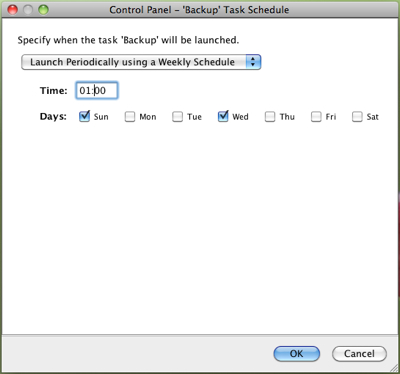
You can then choose the proper kind of scheduling and tune it very simply as illustrated below.

OpenDS Control Panel, scheduling a weekly backupOpenDS Control Panel, Scheduling a backup with Cron like notation

Technorati Tags: , , , ,

Managing multiple OpenDS servers

Opends Logo Tag
Up until now, to manage an OpenDS server, one would need to log onto the machine and starts the Control Panel.

In the next release of OpenDS (OpenDS 2.2), the Control Panel can now connect to remote servers, allowing an administrator to remotely monitor and tune any running instance of OpenDS.

Let’s see what has changed in the Control Panel for the remote access, and what are the limitations.

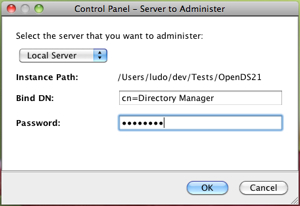
The first thing you will notice when starting the Control Panel is a new dialog which allows you to choose between the local server or a remote server.

OpenDS Control Panel, connection dialogOpenDS Control Panel new connection dialog

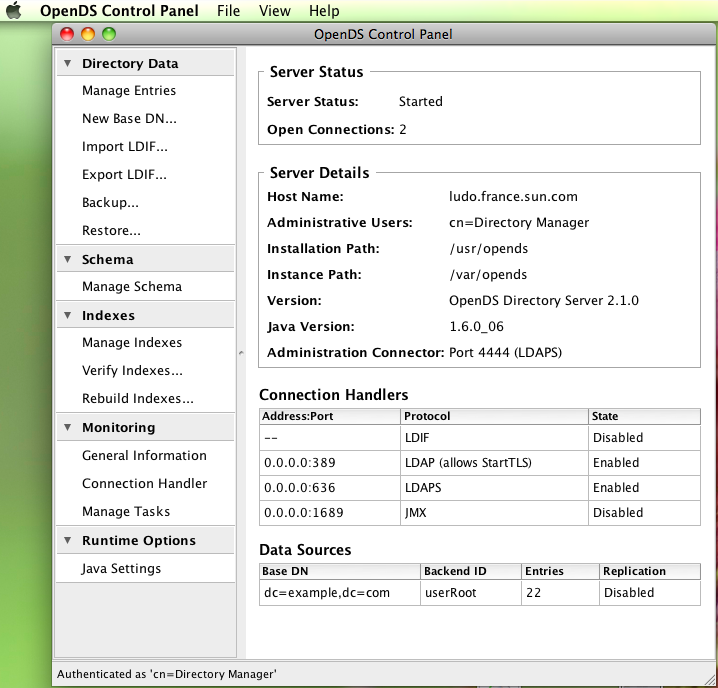
Once you’ve selected the server to administer, you will see the usual Control Panel window with its left action bar and information on the right.

OpenDS Control Panel remote server view

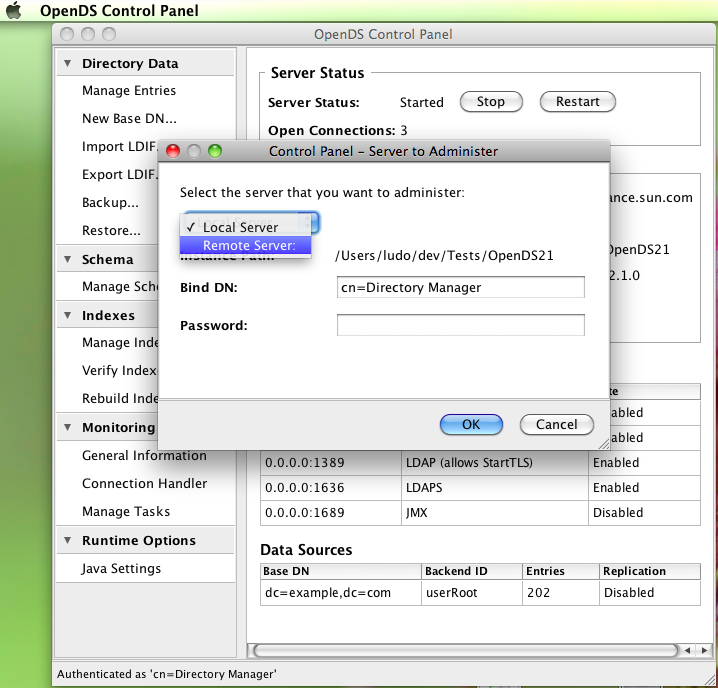
You can change server while the Control Panel is running. It’s in the File menu, when you are on the Main window of the Control Panel.

OpenDS Control Panel, Changing Server to Administer
OpenDS Control Panel,  Changing Server to Administer

There is very little difference between managing a local server and managing a remote server.

One thing you will notice when administering a remote server is that you can’t stop or restart it. Also, you cannot use the Control Panel to configure the Java properties of a remote server. That’s it.

The Control Panel cannot be installed as a standalone tool, it’s a part of the OpenDS server installation, and it can only manage one server at a time, local or remote. But the ability to manage remote servers will reduce the need to logon to each host and run the Control Panel on each instance either physically or using a remote display, simplifying the task of the directory administrators.

If you want to check this capability, you can download and install one of the recent OpenDS daily builds, or wait for next promoted build (2.1.0-build001).

Technorati Tags: , , , ,

Everything has an end…

And so do vacations, and blog silence.

I’ve been back in the office for over a week now but I was trying to catch up with emails, irc, blogs and news, too busy to find the time to blog again.

There’s a lot to say on the LDAP and OpenDS front.

While I was happily riding the Mont Ventoux and around with friends and family, the project kept on moving on the path to OpenDS 2.2 and several new features have been committed by the team in the code repository:

  • The Control Panel can now be used to manage remote server instances.
  • OpenDS now publishes all changes in a public ChangeLog accessible (subject to access control) under the cn=changelog naming context.
  • Replication now supports a Fractional mode allowing to exclude or include only specific attributes of all replicated entries.
  • dsreplication utility has been improved to allow separating the replication service from the replicated OpenDS instance.
  • The import feature has been rewritten and optimized, reducing the time and memory required to import very large set of data.
  • The server now supports 2 new MatchingRules to better deal with Time and Dates (GeneralizedTime syntax).
  • The server now supports the ability to declare a new syntax but default it’s implementation to an existing one.
  • The server now supports the ability to declare new Regular Expression based syntaxes and attributes.
  • The server now supports the ability to declare new Enumeration based syntaxes and attributes.

Most of the new features are already documented as part of the User Documentation of the OpenDS documentation wiki. You can test these features in recent daily builds, or you can wait for the next promoted build (2.1.0-build001) that should come pretty soon.

I will be starting a series of articles to describe with illustrations and details those new features, in the coming days and weeks.

Also in a separated branch, Matt and Bo have been working on an LDAP Client API, which is getting in a good shape to be released for beta testing soon (probably along with OpenDS 2.2).

LDAPCon 2009
The 2nd. International conference on LDAP, LDAPCon 2009 will be held on September 20th and 21st at Waterfront Marriot Hotel , Portland OR, USA. If you haven’t registered yet, please register now ! The registration fee includes access to the LinuxCon 2009 (Sep 21 – 23), and if you still need to be convinced that it’s worth attending, you can check the agenda. I hope to see you there.

Also noticed in the blogosphere and the websphere :

Finally I know the title of this post may have alarmed some of you. I don’t know what’s going to happen in the coming days, but I just hope I won’t have to write another post with the same title on the subject of OpenDS or myself.

Technorati Tags: , , , , , ,

The Agenda for the 2nd International LDAP Conference (LDAPCon 2009).

The agenda for the 2nd International LDAP Conference has been published, and the conference really looks very attractive to me (sure I’ll be presenting and thus I’m a little bit biased Angelic). I can’t wait to be in Portland OR, meet with all the LDAP experts from the various open source projects or directory services vendors and have those lively discussions.

I hope to see you there.

Technorati Tags: , , ,

Updated schema-convert.py script for OpenDS.

Opends Logo TagBack in March, in the series of OpenDS tips, I had written an article and a script to help converting schema files for OpenLDAP to a format suitable for OpenDS.

I received multiple suggestions for the scripts as well as sample schema files that would not load in OpenDS after being converted. Most of the time, it was due to the lack of respect of the RFC syntaxes.

Recently, I found the time to update the script and produce better conversion. You can get the python script here. The March article has been refreshed with the new script as well.

Technorati Tags: , , , , ,

OpenDS turns 3 today…

OpenDS open source project is 3 years oldAnother year has passed and we already end of July. Today is the anniversary day for the OpenDS project which is turning 3 this year.

As usual, this is also time to look back in the mirror and consider what we’ve achieved.

A little more than 10 days ago, we announced the availability of OpenDS 2.0, the new and stable release of our LDAPv3 directory server. OpenDS 2.0 came just about one year after OpenDS 1.0 and 6 months after OpenDS 1.2.

You can read about OpenDS 2.0 features in the Release Notes, but also in the various articles that have relayed our own announcement such as:

Sun OpenDS Standard Edition 2.0 CD
Yesterday, Sun publicly announced the general availability of Sun OpenDS Standard Edition 2.0, a Sun supported version of the OpenDS project, as well as the release of OpenSSO Express Build 8 (due in a couple of weeks).

Sun OpenDS Standard Edition 2.0 has the same features as OpenDS 2.0. Differences are in the branding, the license, the documentation that is available from docs.sun.com in HTML and PDF and of course the support services offered by Sun.

Mark Craig has already posted an illustrated article describing how easy it was to install Sun OpenDS Standard Edition 2.0 on Windows XP.

OpenSSO Express builds are supported snapshots of OpenSSO development. As Pat Patterson, Community Manager for OpenSSO and covering all Identity Products at Sun, detailed on his blog, OpenSSO Express Build 8 includes a new Mobile One Time Password Feature, the Fedlet for .Net and a new task flow enabling single sign-on to Salesforce.com.

As OpenDS is getting mature, we’re seeing public endorsement and use of it. In the last couple of weeks, we had 2 success stories including the use of OpenDS :

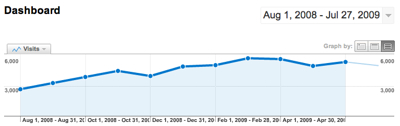
Finaly within a year, the OpenDS Community has more than doubled, in term of members in the community, but as well in the number of active contributors and participants in the #opends IRC channel, and in term of unique visitors on the www.OpenDS.org.

OpenDS.org Monthly visits

I’m proud of what we’ve accomplished in 3 years and even more of the past year. We still have a lot of ideas and customers requirements to build in the OpenDS project. Overall we know where we want to go and we hope our new executives will agree that it’s a nice and viable path to follow…

Technorati Tags: , , , , , , , ,

OpenDS 2.0 on Mac OS X with the latest JVM…

Opends2 PictoMacOSX 10.5.7There is an issue in the start and stop scripts that is preventing OpenDS 2.0 to be installed via Java Web Start on Mac OS X 10.5 with the latest version of the JVM (Update 4 a.k.a 1.6.0_13). I’ve discovered the problem at the same time we were releasing OpenDS 2.0.0 release candidate 4 which was planned to be the last release candidate. So the fix is not the release but has been committed to the trunk.

The issue is that the new JVM does use a larger default minimal heap size and reject any calls with -Xmx if the maximum heap size is smaller than its internal default (around 30MB).

Still OpenDS 2.0 can be installed on Mac OS X and used with the latest JVM, by downloading the Zip file, unzipping it and doing minor edition in the start-ds and stop-ds scripts.

$ unzip ~/Desktop/OpenDS-2.0.0.zip

Archive: /Users/ludo/Desktop/OpenDS-2.0.0.zip

creating: OpenDS-2.0.0/


inflating: OpenDS-2.0.0/upgrade

$ cd OpenDS-2.0.0/bin

In the start-ds and the stop-ds scripts, replace all occurences of the string "-Xms8M -Xmx8M" with "-client"

$ cp start-ds start-ds.orig

$ sed -e "s/-Xms8M -Xmx8M/-client/g" < start-ds.orig > start-ds

$ cp stop-ds stop-ds.orig

$ sed -e "s/-Xms8M -Xmx8M/-client/g" < stop-ds.orig > stop-ds

OpenDS QuickSetup App IconYou can now run the setup program (or launch the QuickSetup application) to install and configure the OpenDS directory server.

Technorati Tags: , , , , , ,

Configuring Replication Groups: A small but important new feature of OpenDS 2.0

Opends2.0

I’m mostly done with the series of post concerning the new features of the latest release of OpenDS, the opensource LDAPv3 directory service. Yesterday, Mathieu, the developer behind Assured Replication, reminded me of a small but important new feature of OpenDS, in the area of replication: the ability to configure Replication Groups.

A replication group is a simple way to relate replicated OpenDS directory servers together. It’s useful when there are more than 2 replicated servers, when the replicated servers are within different data-centers or to distinguished primary servers from secondary servers.

Replications groups are identified by a group ID which is a unique number assigned to a replication domain on a directory server and to replication servers. Group IDs determine how a directory server domain connects to an available replication server. From the list of configured replication servers, a directory server first tries to connect to a replication server that has the same group ID as that of the directory server. If no replication server with a compatible group ID is available, the directory server connects to a replication server with a different group ID.

In practice, it allows to prioritize how the replication traffic is done between the servers. In the case of multiple data-centers, it’s preferable that all directory servers in a data-center are connected to replication servers in the same data-center. Only in the case of absence of a local replication server, a directory server will connect to a remote replication server.


Note that when configuring replication with OpenDS 2.0 and the
dsreplication utility, both the replication server and the directory server are configured in the same process and thus the same host. It will be very rare if the replication server is not working for its directory server.


The figure below is an illustration of 2 Replication Groups, one for each data center.

OpenDS 2.0 Replication Groups with multiple data-centers

Now to configure a replication group ?

A replication group is configured on each directory server and replication server that should be part of the same group.

On the directory server, the replication group is configured per replication domain (i.e. per replicated suffix).

First identify the replication domain

$ bin/dsconfig -D “cn=directory manager” -j /tmp/passwdfile -n -s list-replication-domains –provider-name “Multimaster Synchronization”

cn=admin data (domain 29167)

cn=schema (domain 9674)

dc=example,dc=com (domain 14741)

Then set the group ID for the domain

$ bin/dsconfig -D “cn=directory manager” -j /tmp/passwdfile -n set-replication-domain-prop –provider-name “Multimaster Synchronization” –domain-name “dc=example,dc=com (domain 14741)” –advanced –set group-id:5

For the replication server

$ bin/dsconfig -D “cn=directory manager” -j /tmp/passwdfile -n set-replication-server-prop –provider-name “Multimaster Synchronization” –advanced –set group-id:5

Repeat this to the other directory servers and replication servers that should be part of the same group.

Note that there is a group by default with the group ID 1.

Configuring replication groups have some impact when using Assured Replication, since Assured Replication only works within a single group. So groups can be used to limit the impact of network latency when using Assured Replication, or to constrain the changes to be more consistent in a single data-center.

You can find more information about replication groups in the Replication Architecture reference manual and in the Replication section of the Administration Guide.

Technorati Tags: , , , , ,

Assured Replication: A New Feature of OpenDS 2.0

OpenDS 2.0 has just been released and there are several new and exciting features in it.

To me, the biggest innovation in this release is "Assured Replication", an extension to the loose consistency multi-master replication feature that brings tighter consistency of data between replica. "Assured Replication" is not to be taken for a full synchronous and transactional replication mechanism. A change is not transactionally applied to a set of or all replicas of a topology. With "Assured Replication", the response to an LDAP modification is delayed until the change has been received or applied by other servers, in a best effort mode. It provides a greater assurance that a change is not lost even if the server receiving it crashes.

Opends Assured Replication with Safe Data level 2

Assured Replication can function in 2 modes :

  • Safe Data Mode: an update must be propagated to a defined number of Replication Servers before returning a response to the client. So if the server or the replication server is stopped, the data is still available to all other replicas.
  • Safe Read Mode: an update must be propagated to all directory servers in the domain before the client is returned a response for the update.

Of course, for both modes, it’s possible to configure a timeout interval to prevent LDAP clients to be waiting indefinitely if some servers are not available.

Configuring Assured Replication is pretty straightforward but cannot be done when setting up replication itself. So the first step is to configure Multi-Master Replication for a domain with dsreplication.

$ bin/dsreplication enable –host1 localhost –port1 5444 –bindDN1 ‘cn=directory manager’ –bindPassword1 secret12 –replicationPort1 8989 –host2 localhost –port2 6444 –bindDN2 ‘cn=directory manager’ –bindPassword2 secret12 –replicationPort2 8990 –adminUID admin –adminPassword secret12 –baseDN "dc=example,dc=com" -X -n

Establishing connections ….. Done.

Checking Registration information ….. Done.

Configuring Replication port on server localhost:5444 ….. Done.

Configuring Replication port on server localhost:6444 ….. Done.

Updating replication configuration for baseDN dc=example,dc=com on server localhost:5444 ….. Done.

Updating replication configuration for baseDN dc=example,dc=com on server localhost:6444 ….. Done.

Updating Registration configuration on server localhost:5444 ….. Done.

Updating Registration configuration on server localhost:6444 ….. Done.

Updating replication configuration for baseDN cn=schema on server localhost:5444 ….. Done.

Updating replication configuration for baseDN cn=schema on server localhost:6444 ….. Done.

Initializing Registration information on server localhost:6444 with the contents of server localhost:5444 ….. Done.

Initializing schema on server localhost:6444 with the contents of server localhost:5444 ….. Done.

Replication has been successfully enabled. Note that for replication to work you must initialize the contents of the base DN’s that are being replicated (use dsreplication initialize to do so).

$ bin/dsreplication initialize –baseDN "dc=example,dc=com" –adminUID admin –adminPassword secret12 –hostSource localhost –portSource 5444 –hostDestination localhost –portDestination 6444 -X -n

Initializing base DN dc=example,dc=com with the contents from localhost:5444:

23 entries processed (100 % complete).

Base DN initialized successfully.

See

/var/folders/SH/SHFsRjymHtqiZ4GxPNZERU++Fwk/-Tmp-/opends-replication-737929812662715818.log

for a detailed log of this operation.

$ bin/dsreplication status -h localhost -p 5444 –adminUID admin –adminPassword secret12 -X

dc=example,dc=com – Replication Enabled

=======================================

Server : Entries : M.C. (1) : A.O.M.C. (2) : Port (3) : Security (4)

—————:———:———-:————–:———-:————-

localhost:5444 : 23 : 0 : N/A : 8989 : Disabled

localhost:6444 : 23 : 0 : N/A : 8990 : Disabled

Now that replication is setup, we can enable the Assured Replication mode, using the dsconfig utility. For this, on each of the OpenDS direcotry servers, we first need to retrieve the full name of the replication domain.

$ bin/dsconfig -D cn=directory\ manager -w secret12 -n -s list-replication-domains –provider-name "Multimaster Synchronization"

cn=admin data (domain 29167)
cn=schema (domain 9674)
dc=example,dc=com (domain 14741)

$ bin/dsconfig -D cn=directory\ manager -w secret12 -n set-replication-domain-prop –provider-name "Multimaster Synchronization" –domain-name "dc=example,dc=com (domain 14741)" –advanced –set assured-type:safe-data –set assured-sd-level:2

Note that the Replication Domain has a different value on each server, so you have to repeat these 2 commands on each instance.

Setting the assured level for Safe Data to 2 means that the server will make sure the data has been received by at least 2 replication services before returning to the LDAP client the response to the update request.

From a client point of view, there should be no difference, except that the server might take a little longer to return the response to an update request. In our measures, we found that the response time increased by 25% for Safe Data Level 2, which seems a lot, but honestly, when the response time is in the order of 2ms, it’s hard to notice !

You can find more information about Assured Replication on OpenDS 2.0 documentation wiki, both in the overview of OpenDS Replication Architecture and the Replication Administration Guide, and more specifically Assured Replication Administration Guide

Technorati Tags: , , , , ,

New in OpenDS 2.0: I18N Collation Matching Rules

Opends2 PictoOpenDS 2.0 has just been released and there are several new and exciting features in it.

Today we will be taking a closer look at the I18N Collation Matching Rules.

In LDAP, most of the data is made of DirectoryStrings which are UTF-8 encoded strings. LDAPv3 specifications and more precisely RFC 4518, defines the way to prepare UTF-8 strings to be compared in LDAP and OpenDS being fully compliant with LDAPv3 implements this RFC.

This means that the server will properly case-fold non-ascii characters and be able to compare properly and in a case insensitive way, none ascii characters like the French é or Japanese characters.

OpenDS Entry Editor Panel

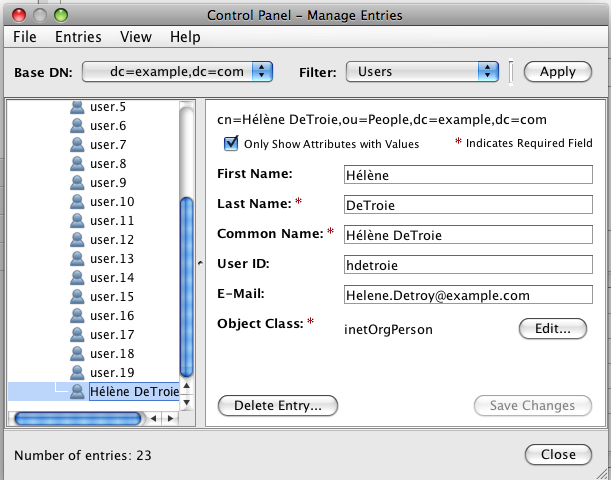
Let’s work with an example, an entry with the givenName “Hélène” illustrated on the right (click on the image for a larger view).

If I search the directory for that givenname, I can retrieve the entry:

$ bin/ldapsearch -p 2389 -b “dc=example,dc=com” ‘(givenname=hélène)’
dn:: Y249SMOpbMOobmUgRGVUcm9pZSxvdT1QZW9wbGUsZGM9ZXhhbXBsZSxkYz1jb20=
mail: Helene.Detroy@example.com
givenName:: SMOpbMOobmU=
objectClass: person
objectClass: inetOrgPerson
objectClass: organizationalPerson
objectClass: top
uid: hdetroie
cn:: SMOpbMOobmUgRGVUcm9pZQ==
sn: DeTroie

$ bin/ldapsearch -p 2389 -b “dc=example,dc=com” ‘(givenname=HÉLNE)’ givenName
dn:: Y249SMOpbMOobmUgRGVUcm9pZSxvdT1QZW9wbGUsZGM9ZXhhbXBsZSxkYz1jb20=
givenName:: SMOpbMOobmU=

Note : DN, CN and GivenName are base64 encoded in the result as expected per LDIF Specifications.

Note : To be able to type in correctly the string “hélène” in a terminal (like to the filters above), make sure the LANG is set to use UTF-8 encoded characters (LANG=en_US.UTF-8).
Let’s see what happens if I’m searching for the same user without the accentuated letters.

$ bin/ldapsearch -p 2389 -b “dc=example,dc=com” ‘(givenname=helene)’

$


Nothing returned. This is because in Unicode the letter e and é do not normalize the same. Now this is a big problem, especially in Europe because we do not like when our name is not written how it should be and also because the person that searches may not remember exactly how to spell the name or may not know how to type the composed character on his machine. Also in French (but with other locales as well), the letters e and é and É are considered comparing equal.

That’s where the I18N Collation Matching Rules come to the rescue.

OpenDS 2.0, like his far ancestor Sun Directory Server, supports by default a set of extensible matching rules that are locale specific.

This means I can now search for the GivenName according to the Collation Rules associated with French or German or Norvegian or Japanese.

Each locale has been assigned an OID and then there are 6 different matching rules per locale : LowerOrEqual, LowerThan, Equality,GreaterOrEqual, GreaterThan , Substring.

So if one would like to match givenname for equality according to the French collation rules, the filter would be the following: (givenname:1.3.6.1.4.1.42.2.27.9.4.76.1.3:=Helene)

$ bin/ldapsearch -p 2389 -b “dc=example,dc=com” ‘(givenname:1.3.6.1.4.1.42.2.27.9.4.76.1.3:=helene)’ givenName
dn:: Y249SMOpbMOobmUgRGVUcm9pZSxvdT1QZW9wbGUsZGM9ZXhhbXBsZSxkYz1jb20=
givenName:: SMOpbMOobmU=

Or for a substring match, still according to the French collation rules:

$ bin/ldapsearch -p 2389 -b “dc=example,dc=com” ‘(givenname:1.3.6.1.4.1.42.2.27.9.4.76.1.6:=hel*)’ givenName
dn:: Y249SMOpbMOobmUgRGVUcm9pZSxvdT1QZW9wbGUsZGM9ZXhhbXBsZSxkYz1jb20=
givenName:: SMOpbMOobmU=


But remembering OID for each locale and type of matching is not easy. So we’ve also provided some shortcuts in the form of the locale name and a short string representing the different matching; lte, lt, eq, gte, gt, sub

Examples:

$ bin/ldapsearch -p 2389 -b “dc=example,dc=com” ‘(givenname:fr.eq:=helene)’ givenName
dn:: Y249SMOpbMOobmUgRGVUcm9pZSxvdT1QZW9wbGUsZGM9ZXhhbXBsZSxkYz1jb20=
givenName:: SMOpbMOobmU=

$ bin/ldapsearch -p 2389 -b “dc=example,dc=com” ‘(givenname:fr.sub:=hel*)’ givenName
dn:: Y249SMOpbMOobmUgRGVUcm9pZSxvdT1QZW9wbGUsZGM9ZXhhbXBsZSxkYz1jb20=
givenName:: SMOpbMOobmU=

$ bin/ldapsearch -p 2389 -b “dc=example,dc=com” ‘(givenname:de.eq:=helene)’ givenName
dn:: Y249SMOpbMOobmUgRGVUcm9pZSxvdT1QZW9wbGUsZGM9ZXhhbXBsZSxkYz1jb20=
givenName:: SMOpbMOobmU=

So not only those I18N Collation Matching Rules can be used in Search filters to search, but they can be used for indexing as well, and also for server side sorting.

Unfortunately, setting extensible matching rules for indexes is not possible from the ControlPanel. So it has to be done with dsconfig.

$ dsconfig set-local-db-index-prop \
–backend-name userRoot \
–index-name givenName \
–add index-extensible-matching-rule:fr.eq \
–hostname ludovic-poitous-computer-2.local \
–port 5444 \
–trustStorePath /Users/ludo/dev/Tests/OpenDS2rc4/config/admin-truststore \
–bindDN cn=Directory\ Manager \
–bindPassword ****** \
–no-prompt


Don’t forget to rebuild the index for the givenName attribute (bin/rebuild-index -b dc=example,dc=com -i givenname).

You can find more information about the I18N Collation Matching Rules on the OpenDS 2.0 Documentation Wiki.

Technorati Tags: , , , , ,