OpenDJ: Troubleshooting LDAP SSL connections

Troubleshooting Secure Socket Layer (SSL, also now standardized as TLS) issues is not trivial and there is no secret sauce specific to OpenDJ.

Should an LDAP SSL connection fails due to the server, you should find a descriptive error message in the server’s errors log (in logs/errors). But sometime the connection is aborted by the client with some obscure message. Often we see a message ending with ” javax.net.ssl.SSLHandshakeException: no cipher suites in common“.

Java has some debugging capabilities embedded and they are pretty easy to use with the OpenDJ LDAP directory server, which just need to be restarted with some additional arguments: -Djavax.net.debug=all or -Djavax.net.debug=ssl.

There are two ways to add extra arguments to the OpenDJ server startup command, using an environment variable, or using the java.properties file.

Using env variable

– you define the OPENDS_JAVA_ARGS environment variable. And you restart the server. If you do so, make sure you include all previous arguments.

OPENDS_JAVA_ARGS='-server -Xms1G -Xmx1G -Djavax.net.debug=ssl,handshake,trustmanager' bin/start-ds

Using the java.properties file

Edit the java.properties file in the config directory.
Since you probably only want to track the OpenDS directory server SSL access, you should append the -Djavax.net.debug=ssl,handshake,trustmanager args to the start-ds line (rather than applying it to all commands).

start-ds.java-args=-Xms1G -Xmx1G -server -Djavax.net.debug=ssl,handshake,trustmanager

Save the file and run the dsjavaproperties command:

bin/dsjavaproperties

Now restart the server, using the start-ds command

Where is the output ?

All SSL related logs are output in the logs/server.out file.
To test, you can use ldapsearch :

bin/ldapsearch -Z -X -p 1636 -b "" -s base '(objectclass=*)'

And if you look into the logs/server.out file, you will see something similar to this:

Using SSLEngineImpl.
 Allow unsafe renegotiation: false
 Allow legacy hello messages: true
 Is initial handshake: true
 Is secure renegotiation: false
 LDAP Request Handler 0 for connection handler LDAP Connection Handler 0.0.0.0 port 1636, READ: SSL v2, contentType = Handshake, translated length = 81
 *** ClientHello, TLSv1
 RandomCookie: GMT: 1287771875 bytes = { 68, 231, 5, 253, 105, 26, 137, 36, 38, 238, 12, 141, 110, 12, 59, 10, 192, 135, 113, 119, 108, 153, 10, 31, 127, 120, 110, 61 }
 Session ID: {}
 Cipher Suites: [SSL_RSA_WITH_RC4_128_MD5, SSL_RSA_WITH_RC4_128_SHA, TLS_RSA_WITH_AES_128_CBC_SHA, TLS_RSA_WITH_AES_256_CBC_SHA, TLS_DHE_RSA_WITH_AES_128_CBC_SHA, TLS_DHE_RSA_WITH_AES_256_CBC_SHA, TLS_DHE_DSS_WITH_AES_128_CBC_SHA, TLS_DHE_DSS_WITH_AES_256_CBC_SHA, SSL_RSA_WITH_3DES_EDE_CBC_SHA, SSL_DHE_RSA_WITH_3DES_EDE_CBC_SHA, SSL_DHE_DSS_WITH_3DES_EDE_CBC_SHA, SSL_RSA_WITH_DES_CBC_SHA, SSL_DHE_RSA_WITH_DES_CBC_SHA, SSL_DHE_DSS_WITH_DES_CBC_SHA, SSL_RSA_EXPORT_WITH_RC4_40_MD5, SSL_RSA_EXPORT_WITH_DES40_CBC_SHA, SSL_DHE_RSA_EXPORT_WITH_DES40_CBC_SHA, SSL_DHE_DSS_EXPORT_WITH_DES40_CBC_SHA, TLS_EMPTY_RENEGOTIATION_INFO_SCSV]
 ...

This will help you to identify what part of the secure connection is failing and fix it.

Note that -Djavax.net.debug=ssl enables debug of the SSL connections, while -Djavax.net.debug=all enables full debugging including use of certificates, and more. You can also find more debug options by using -Djavax.net.debug=help.

 

OpenDJ Tip: Auto-completion of dsconfig command

With OpenDJ LDAP directory services, a single command-line tool, dsconfig, is used to manage every configuration parameter of the server.

The dsconfig command has several modes and useful options, some of them are not well known. So let me repeat them.

  • interactive mode: if started with no parameter or no command, the tool goes in interactive mode. This is a nice way to discover the various parts of OpenDJ configuration.
  • advanced mode: There are really a lot of configuration parameters in OpenDJ, so not all of them can be read or set by default. An advanced mode allows to view and edit the hidden ones.
  • scripted mode: dsconfig can be used with a file containing several commands, and will call them one after the other.
  • teaching mode: if the option –displayCommand is used in interactive mode, it will display the complete command to use for non interactive mode, or for scripted mode.
But regardless of the different modes, there are really too many commands and options to remember. So shell completion can come to the rescue.
Just insert the following lines in your .bashrc or .cshrc file.

Bash:

complete -W "`bin/dsconfig --help-all|grep '^[a-z].*'`" dsconfig

csh:

set DSC = `<OpenDJPath>/bin/dsconfig --help-all|grep '^[a-z].*'`
complete dsconfig "p/1/($DSC)/"

And now type bin/dsconfig set[TAB] and the list of commands appears magically…

$ dsconfig set-password-[TAB][TAB]
set-password-generator-prop       set-password-storage-scheme-prop
set-password-policy-prop          set-password-validator-prop
$ dsconfig set-password-

OpenDJ 2.4.3 is now available

Another revision of OpenDJ has just been released. OpenDJ 2.4.3 is an update release of the OpenDJ project and resolves several issues found around the External Change Log and the bundled database version. The version is built out of revision 7007 of the b2.4 branch of the code repository.

The full details about the release have been posted in the OpenDJ 2.4.3 Release Notes.

As usual, you can find every thing on the OpenDJ Downloads page:

In addition, some draft documentation for OpenDJ, and more specifically the Administration Guide, are now published (and regularly updated) on the OpenDJ project site.

Feedback is important to us and you can participate on the IRC channel, the mailing lists or join our community.

Enjoy !

Trends that we like !

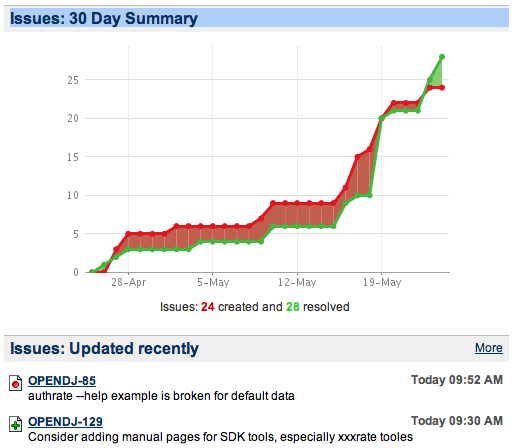
Bug trend on May 24th, for OpenDJ, the open source LDAP directory server in JavaWe (temporarily ?) have a pretty nice graph of our bug trend, on the issue tracker page of the OpenDJ project.
Kudos to Matt and Mark who’ve been really focusing on preparing two major areas of the project : the LDAP client SDK and the Core documentation for the whole project.

OpenDJ: Enabling the External Change Log on a single server

Yesterday, I described how easy it is to enable Multi-Master Replication between 2 instances of OpenDJ. One of the nice thing with OpenDJ replication, is that all changes are also publicly available (subject to access control) through LDAP under the cn=changelog suffix, also nick-named the External Change Log.

But the command to enable replication and thus the External Change Log requires 2 servers. So what if you want to enable the External Change Log on a single server ?

Note that this is not a fully supported procedure, but is handy for unit testing against the External Change Log. In production environment, you will have multiple servers for high availability and thus the External Change Log will be automatically configured.

Well you cannot use the dsreplication command, but you can configure the OpenDJ instance with the dsconfig utility.

$ bin/dsconfig create-replication-server -h ldap1.example.com -p 4444 \
  -D "cn=directory manager" -w secret12 -X -n \
  --provider-name "Multimaster Synchronization" --set replication-port:8989 \
  --set replication-server-id:2 --type generic
  
$ bin/dsconfig create-replication-domain -h ldap1.example.com -p 4444 \
  -D "cn=directory manager" -w secret12 -X -n \
  --provider-name "Multimaster Synchronization" --set base-dn:dc=example,dc=com \
  --set replication-server:ldap1.example.com:8989 --set server-id:3 \
  --type generic --domain-name example_com

If you want to be able to join this server in a replication topology, you should also create the global administrator’s entry. If you do so, then you will be able to use the dsreplication enable command as illustrated here.

$ bin/dsframework create-admin-user -X -h ldap1.example.com -p 4444 \
  -D "cn=Directory Manager" -w secret12 --userID admin --set password:password

Once enabled, you can read or search the changes with ldapsearch or other LDAP clients :

$ bin/ldapsearch -D cn=directory\ manager -w secret12 -h ldap1.example.com -p 1389 \
  -J "1.3.6.1.4.1.26027.1.5.4:false:;" -b "cn=changelog" '(objectclass=*)'
dn: cn=changelog
cn: changelog
objectClass: top
objectClass: container

# Public changelog exchange control(1.3.6.1.4.1.26027.1.5.4): dc=example,dc=com:0000012fd9bdf863000300000001;
dn: replicationCSN=0000012fd9bdf863000300000001,dc=example,dc=com,cn=changelog
targetDN: cn=a,ou=people,dc=example,dc=com
changeNumber: 0
changes:: b2JqZWN0Q2xhc3M6IHBlcnNvbgpvYmplY3RDbGFzczogdG9wCmNuOiBhCnNuOiBhCmVudH
 J5VVVJRDogNWQzMTNlY2UtYjY4Mi00MDFiLTg2NmYtM2NiZWNlMWNjNTJjCmNyZWF0ZVRpbWVzdGFtc
 DogMjAxMTA1MTAxMTQ5NTZaCmNyZWF0b3JzTmFtZTogY249RGlyZWN0b3J5IE1hbmFnZXIsY249Um9v
 dCBETnMsY249Y29uZmlnCg==
changeType: add
changeTime: 20110510114956Z
objectClass: top
objectClass: changeLogEntry

# Public changelog exchange control(1.3.6.1.4.1.26027.1.5.4): dc=example,dc=com:0000012fd9be46af000300000002;
dn: replicationCSN=0000012fd9be46af000300000002,dc=example,dc=com,cn=changelog
targetDN: cn=a,ou=people,dc=example,dc=com
changeNumber: 0
changes:: YWRkOiBkZXNjcmlwdGlvbgpkZXNjcmlwdGlvbjogTmV3IG9uZQotCnJlcGxhY2U6IG1vZG
 lmaWVyc05hbWUKbW9kaWZpZXJzTmFtZTogY249RGlyZWN0b3J5IE1hbmFnZXIsY249Um9vdCBETnMsY
 249Y29uZmlnCi0KcmVwbGFjZTogbW9kaWZ5VGltZXN0YW1wCm1vZGlmeVRpbWVzdGFtcDogMjAxMTA1
 MTAxMTUwMTZaCi0K
changeType: modify
changeTime: 20110510115016Z
objectClass: top
objectClass: changeLogEntry

Note: the search above uses the “Cookie Control” which is the optimized way to search the External Change Log. The value “;” means that the “cookie” is unknown, and therefore the search starts from the first change. If you want to continue from the last change received, provide the string value that is either in the ChangeLogCookie operational attribute (returned if asked for) or the comment before the change itself.

OpenDJ: Quick Replication setup

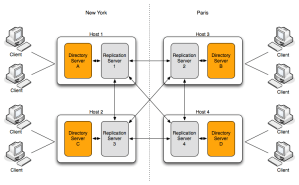
OpenDJ Servers Replication

As we develop OpenDJ, we spend a lot of time testing, whether it’s a new feature or a correction to an existing one. We usually write some unit tests to validate the code and then some functional tests to check the feature from a “user” point of view. While the unit tests are typically run with a single server, the functional or integration tests are run with configurations that match our customers deployment. And one of the given fact for any directory service deployment with OpenDJ that I’m aware of, is that the service is made of two or more OpenDJ directory servers with Multi-Master Replication enabled between them.

Setting up Multi-Master Replication with OpenDJ is quite easy and I’m going to demonstrate it here:

Lets assume we want to install 2 OpenDJ servers on the following hosts : ldap1.example.com and ldap2.example.com. For simplicity and because for test we avoid running tests with root privileges, we will configure the server to use port 1389 and 1636 for LDAP and LDAPS respectively.

On ldap1.example.com

$ unzip OpenDJ-2.4.2.zip
$ cd OpenDJ-2.4.2
$ ./setup -i -n -b "dc=example,dc=com" -d 20 -h ldap1.example.com -p 1389 \
  --adminConnectorPort 4444 -D "cn=Directory Manager" -w "secret12" -q -Z 1636 \
  --generateSelfSignedCertificate

Do the same on ldap2.example.com, the parameters being the same except for the -h option that should be ldap2.example.com

Now, you have 2 instances of OpenDJ configured and running with 20 sample entries in the suffix “dc=example,dc=com”. Let’s enable replication:

$ bin/dsreplication enable --host1 ldap1.example.com --port1 4444\
  --bindDN1 "cn=directory manager" \
  --bindPassword1 secret12 --replicationPort1 8989 \
  --host2 ldap2.example.com --port2 4444 --bindDN2 "cn=directory manager" \
  --bindPassword2 secret12 --replicationPort2 8989 \
  --adminUID admin --adminPassword password --baseDN "dc=example,dc=com" -X -n

And now make sure they both have the same data:

$ bin/dsreplication initialize --baseDN "dc=example,dc=com" \
  --adminUID admin --adminPassword password \
  --hostSource ldap1.example.com --portSource 4444 \
  --hostDestination ldap2.example.com --portDestination 4444 -X -n

For my daily tests I’ve put the commands in a script that I can run and will deploy 2 servers, enable replication between them and initialize them, all on a single machine (using different ports for LDAP and LDAPS).

Now if you want to add a 3rd server in the replication topology, install and configure it like the first 2 ones. And join it to the replication topology by repeating the last 2 commands above, replacing ldap2.example.com with the hostname of the 3rd server. Need a 4th one ? Repeat again, keeping ldap1.example.com as the server of reference.

More OpenDJ Tips…

I’ve already mentioned that Mark Craig has joined ForgeRock and started to blog about OpenDJ.

Here’s a few tips he’s recently posted about OpenDJ :

I’m sure there are more to come.

If you’re not following Mark’s blog feed yet, you should !

LDAP Advanced Administration for Enterprises…

OpenDJ directory server has one default administrator that can manage all aspects of the server.

In an earlier post, I’ve described how to create multiple administrative accounts in OpenDJ, and in another one, I’ve talked about the Privilege system and how it can be used to tailor the administrative roles of each account.

In most enterprises, administrators are usually employees and therefore have their own entries and password. For auditing purpose, security processes require that a change or an administrative task on the directory be done as the true person and not the administrative account. But often there are multiple administrators, and they can change role frequently. So what is the best practice for granting employees some administrative privileges ?

An efficient and manageable way  is to create an Administrators’ group and grant the privileges to all members of that group. When an employee, is no longer administrator, simply remove him from the group and he will loose all privileges associated. Likewise, adding a new administrator is just adding a member in the group.

With OpenDJ, this can be done with 2 simple entries : a group and a privilege collective attribute subentry.

The Group :

dn: cn=Administrators,ou=Groups,dc=example,dc=com
objectClass: groupOfNames
objectClass: top
description: LDAP Administrators Group
cn: Administrators
member: uid=ludo,ou=People,dc=example,dc=com
member: uid=Matt,ou=people,dc=example,dc=com

The Collective Attribute Subentry :

dn: cn=Administrators Privilege,dc=example,dc=com
objectClass: extensibleObject
objectClass: collectiveAttributeSubentry
objectClass: top
objectClass: subentry
cn: Administrators Privilege
ds-privilege-name;collective: config-read
ds-privilege-name;collective: config-write
ds-privilege-name;collective: ldif-export
ds-privilege-name;collective: modify-acl
ds-privilege-name;collective: password-reset
ds-privilege-name;collective: proxied-auth
subtreeSpecification: {base "ou=people", specificationFilter
  "(isMemberOf=cn=Administrators,ou=groups,dc=example,dc=com)" }

How does it work ?

Collective Attributes is a standard based LDAP functionality that allows to define attributes and value that are defined once and appear in all entries that match the subtreeSpecification. Collective Attributes are defined in RFC 3671. For those who are familiar with Sun Directory Server’s Class Of Service, Collective Attributes provide a similar function, but based on industry approved standard.

OpenDJ collective attributes feature supports a few extensions to facilitate their use.

First, the standard way to define a collective attribute is to define it in the schema with a “c–” prefix. With OpenDJ, any existing attribute can be defined as collective with the ;collective attribute option.

Second, the scope of a Collective Attribute subentry as defined by the standard is a subtree, but the only filter possible is to specify the object class it applies to. We’ve extended the specificationFilter to accept an arbitrary LDAP filter, allowing a finer grained control of which entries are targeted.

In the example above, the filter is used to restrict the Privilege Collective Attribute subentry to apply only to entries that have the isMemberOf attribute with the value “cn=Administrators,ou=Groups,dc=example,dc=com”.

IsMemberOf is an operational read-only attribute (virtual) that is a back-link to the groups a user belongs to. OpenDJ does support the isMemberOf attribute for static groups, nested static groups and dynamic groups.

The subtreeSpecification also contains a base “ou=people” to restrict the targeted entries to the ou=people subtree. There are additional field allowed in the subtreeSpecification to indicate a depth in the tree for example.

As a result, collective attribute subentries, combined with groups, provide a flexible way to “inject” attributes and values to a specified set of entries, either to grant them specific privileges like in our example, or to decorate entries based on some common properties.

This said, remember that privileges are set in addition to the Access Controls. So giving a user the password-reset privilege for example, will be useless if there is no ACI allowing him or her to modify the userPassword attribute of other users. Granting access through an ACI to a group is as simple as using groupdn=”ldap:///cn=Administrators,dc=example,dc=com”;  to designate the authorized identities.

A new release of OpenDJ : 2.4.2

We’ve just pushed another consolidation release of OpenDJ, the open source Directory services in Java, resolving a number of issues around the External Changelog and multi-master Replication, resulting in a more efficient and more reliable service, especially after network outages.

The full details about the release have been posted in the OpenDJ 2.4.2 Release Notes.

As usual, you can find every thing on the OpenDJ Downloads page:

Enjoy !

Sudoers in LDAP with OpenDJ directory services

Mark has just published another tutorial on how to setup Sudo with OpenDJ.

The schema for sudo is part of the sudo package, but for convenience, you can find here a copy that works with OpenDJ.

Linux and Unix LDAP clients and RFC2307 support

Quite often when one tries to migrate data from a directory server to another, small differences are discovered that prevent a direct and smooth migration. One of the most common issues when migrating from OpenLDAP or other Linux centric directory server to OpenDJ is around the schema for NIS, or the RFC 2307.

Before we dive into the core of the problem, let’s describe the symptoms:

Part of migrating from one directory to another consist of exporting the data to a common textual format, most likely LDIF, and import it in the new server. If you try to import some data in OpenDJ and it rejects entries as invalid with messages like the one just below, then you’ve just hit a schema issue with RFC 2307.

LDAP: error code 65 – Entry cn=MyGroup,ou=groups,dc=example,dc=com violates the Directory Server schema configuration because it does not include a structural objectclass.  All entries must contain a structural objectclass

Why a schema issue ?

Well, RFC 2307, “An Approach for Using LDAP as a Network Information Service” was published as an experimental RFC in 1998. As Unix vendors started to use it, they found a few issues which were addressed in an internet draft nicknamed rfc2307bis (the latest version can be found here). Solaris and HP-UX started to use this later schema, while Linux sticked to the official RFC.

One of the main difference between the RFC and the internet draft, is the PosixGroup object class definition that was changed from Structural to Auxiliary, hence the failure to import an entry defined with the RFC 2307 schema into a server supporting the rfc2307bis schema.

So what to do if I want to successfully import my data ?

There are 2 options : Fix the data to be compliant with rfc230bis schema or configure OpenDJ schema to be strictly RFC2307 compliant.

Fixing the data is quite simple, but requires basic knowledge of LDIF.

Since in rfc2307bis the posixGroup is Auxiliary, the entries are missing a Structural object class to be valid. The simplest way to fix that is to add the namedObject Structural object class.

dn: cn=MyGroup,ou=Groups,dc=example,dc=com
cn: MyGroup
objectClass: top
objectClass: posixGroup
objectClass: namedObject
gidNumber: 1001
description: My Group
memberUid: 1
memberUid: 10

Make sure you change all group definition and you can now import the data to OpenDJ.

Linux pam_ldap has full support for RFC2307bis. You just need to update the /etc/pam_ldap.conf file with the following line :

nss_schema rfc2307bis

Now, if you prefer to remain strictly compliant with RFC 2307, you need to change the schema of the OpenDJ server. Basically, you just need to stop the server, remove the 04-rfc2307bis.ldif file from the config/schema/ directory (save it in case you need it later) and add in the config/schema/ directory, the 04-rfc2307.ldif file. You can now import the data in OpenDJ.

This 04-rfc2307.ldif file is not part of the current distribution of OpenDJ, but we will add it pretty soon, however not as the default schema.

Ubuntu 10.04 LDAP naming service with OpenDJ

Ubuntu documentation with regards to LDAP client authentication has been available for a while but is limited to a few directory servers. As more and more companies are looking for a replacement of their legacy Sun Directory Server, I’m happy to relay that Dave Koelmeyer has just posted a very detailed and step by step guide on how to do LDAP authentication with Ubuntu 10.04 and OpenDJ 2.4.1. A nice complement to the official docs. And a nice contribution to the OpenDJ community.

Enjoy !

What’s up ? Doc !

It’s been a few very busy weeks and I haven’t found the time to properly introduce a new member of the ForgeRock Grenoble Engineering Center : Mark Craig.

After Matthew who joined us as Architect for OpenDJ, Gary who is covering Quality Assurance for our products, Mark Craig has joined us on the 1st day of April to cover a very important part of any real Product : the documentation.

Mark comes from Sun Microsystems (and a few months at Oracle) where he has played different roles, from technical writer, to manager for all technical writers in the Identity Management BU, to managing the Directory Integration Team responsible for customer interactions and audits, performance benchmarks and assisting POCs. At ForgeRock, Mark goes back to his roots and things he enjoys and excels in: writing.

You can read Mark’s prose on his new blog (Margin Notes 2.0), OpenDJ blog or already on ForgeRock documentation wiki.

New releases of OpenAM and OpenDJ !

It’s the happy hour, with a double release day at ForgeRock.

OpenAM 9.5.2 has just been released, along with the J2EE Agents 3.0.3 and are now available for downloads from ForgeRock. You can find the release details in the Release Notes.

OpenDJ 2.4.1 has also been released today. The patch release can be found on the Downloads page in various forms: Java WebStart Installer, Zip package or SVR4 package. The Release Notes have been posted on the Documentation wiki.

A couple of News feeds for OpenDJ and ForgeRock

The OpenDJ development team has its own blog now. You will find news, tips and other information about the Open source ldapv3 Directory services in Java.

On the same topic, there is now an aggregator of news feeds related to ForgeRock that has been set and you can read all the news from a single place : http://blogs.forgerock.org/aggregator/